> For the complete documentation index, see [llms.txt](https://docs.icpc1hn.work/llms.txt). Markdown versions of documentation pages are available by appending `.md` to page URLs; this page is available as [Markdown](https://docs.icpc1hn.work/2.-huong-dan-du-dung-app-icpc1hn/khach-hang/khach-hang-trong-tam.md).
# Khách hàng trọng tâm
#### **Cách 1: Đăng ký khách hàng trọng tâm từ khách hàng tổ chức**
**B1:** Mục **Khách hàng** ⇒ **KH tổ chức** ⇒ Chọn KH để đăng ký KH trọng tâm
{% hint style="info" %} **Lưu ý: Nếu giao diện không đúng như hướng dẫn ⇒ Đăng xuất và đăng nhập lại web**
{% endhint %}
{% columns %}
{% column width="50%" %}
#### Đối vs nhân viên OTC
* Chỉ cần nhập ghi chú (nếu cần), sau đó bấm xác nhận
* Đăng ký trong phạm vi từ 120 - 150 khách hàng trọng tâm
* Chỉ được check call + lên đơn tại khách hàng trọng tâm được duyệt
{% endcolumn %}
{% column width="50%" %}
#### Đối với nv ETC (kênh bệnh viện)
Đăng ký các thông tin sau:
* Kênh bán
* Sản phẩm
* Ghi chú (nếu cần)
* Không giới hạn khách hàng trọng tâm đăng ký
* Chỉ được lên đơn tại SP+Kênh bán+Khách hàng đăng ký
{% endcolumn %}
{% endcolumns %}
#### **Cách 2: Upload file Excel danh sách khách hàng trọng tâm**
**B1:** Trong mục **Khách hàng** ⇒ **KH trọng tâm** ⇒ **Cá nhân** ⇒ Chọn **Upload excel**
**B2:** Tải file excel mẫu về máy, cập nhật danh sách cần đẩy lên theo file mẫu
*Lưu ý: Nếu là OTC thì bỏ trống 2 cột Kênh bán + Mã SP*
**B3:** Chọn **Tải excel**, kiểm tra lại lần nữa trước khi bấm **Xác nhận**
**B4:** Danh sách đăng ký KH trọng tâm tại đây
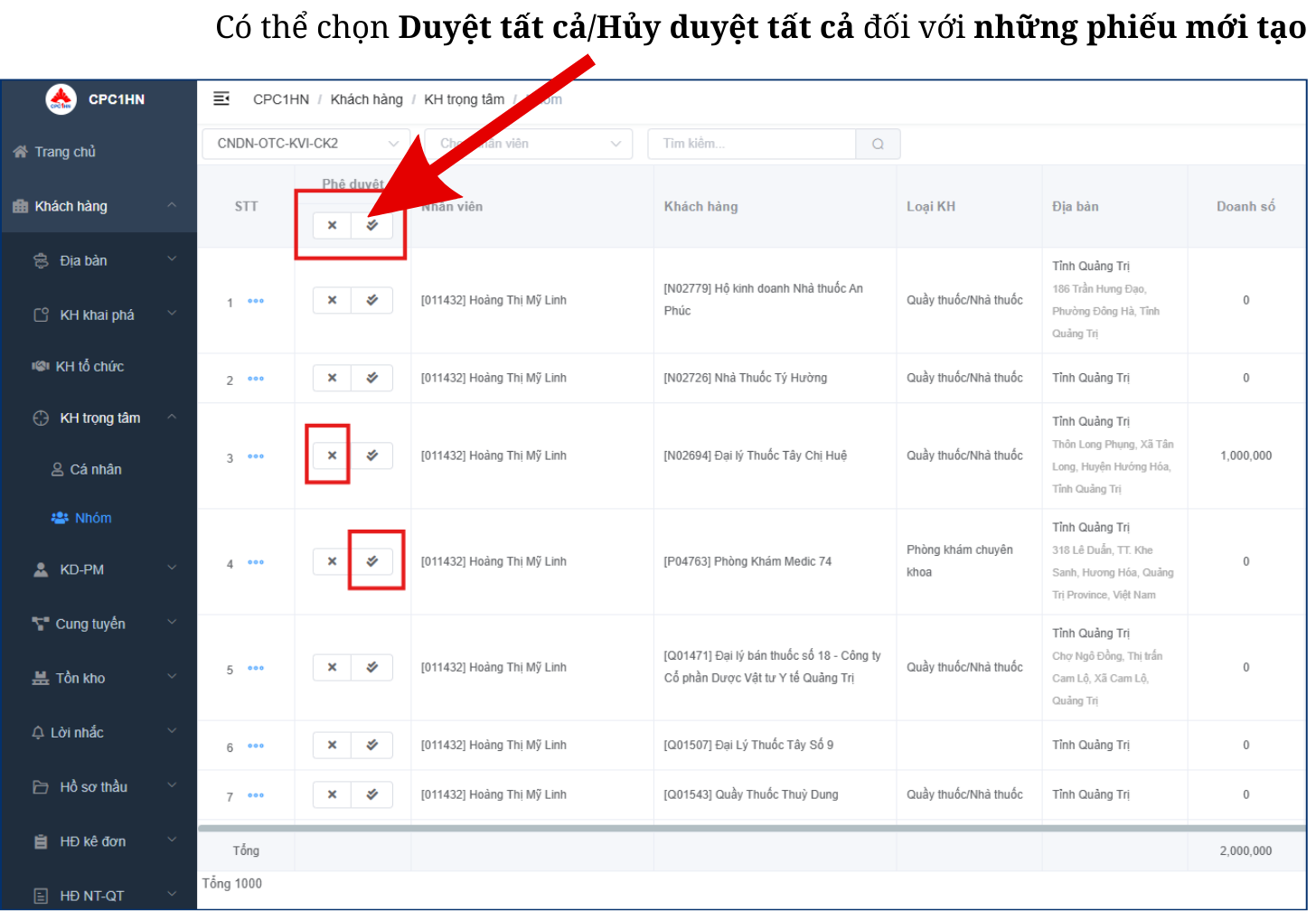
**Quản lý sẽ duyệt** đăng ký khách hàng trọng tâm tại mục **KH trọng tâm ⇒ Nhóm**
*Lưu ý: Đối với OTC Miền Bắc, **Giám đốc sẽ duyệt đăng ký***


.png?alt=media&token=3a26cc80-b007-4fd4-a5b2-cce909fed0c5)
.png?alt=media&token=89340868-6153-40ce-98eb-317a2cb6722d)
.png?alt=media&token=9893940f-c21c-46bc-9294-c09059b2d3af)
.png?alt=media&token=bf4975ba-8ee8-42eb-be8c-675e0e29cc5b)